AI Resume Checker With ChatGPT: Prompts, Steps, and What It Can’t Do
ChatGPT is a genuinely useful second pair of eyes for your resume — it proofreads, rewrites weak bullets, and pulls keywords out of a job posting in seconds. But the moment you want an actual match score, you need a dedicated AI resume checker running alongside it, because OpenAI built ChatGPT as a general-purpose language model, not an Applicant Tracking System simulator.
This guide shows the exact prompts to review and tailor your resume with ChatGPT, the step-by-step method, and the hard limits — no ATS scoring, no match percentage, and a real risk of invented numbers — so you know where to stop trusting it.

Can ChatGPT actually check your resume?
ChatGPT can read a resume and comment on it the way a sharp friend would — but «checking» means different things depending on what you’re actually asking for. It’s strong at line-by-line editing and weak at anything that requires simulating real hiring software.
What ChatGPT does well
ChatGPT handles a handful of resume tasks reliably well:
- Proofreading and grammar — catching typos and awkward phrasing fast
- Rewriting weak bullets into achievement statements — turning «responsible for managing a team» into something with a verb and a result
- Extracting keywords from a job description — paste both texts and ask for the gap
- Drafting a summary or a cover letter from your existing bullets
- Spotting obvious gaps in a work history
All of this is fast and free-form, and it’s why ChatGPT resume review has become a common first step for job seekers.
What ChatGPT can’t do
It cannot score your resume against an ATS, cannot simulate how Workday, Greenhouse, Lever or iCIMS would parse your file, and cannot give you a keyword match percentage. It also can’t reliably catch formatting problems that break parsing, because it never sees your resume as a scanner does — it only sees the text you paste in. That blind spot covers:
- Two-column layouts
- Text boxes and headers/footers
- Tables used for layout instead of data
- Images or icons standing in for text
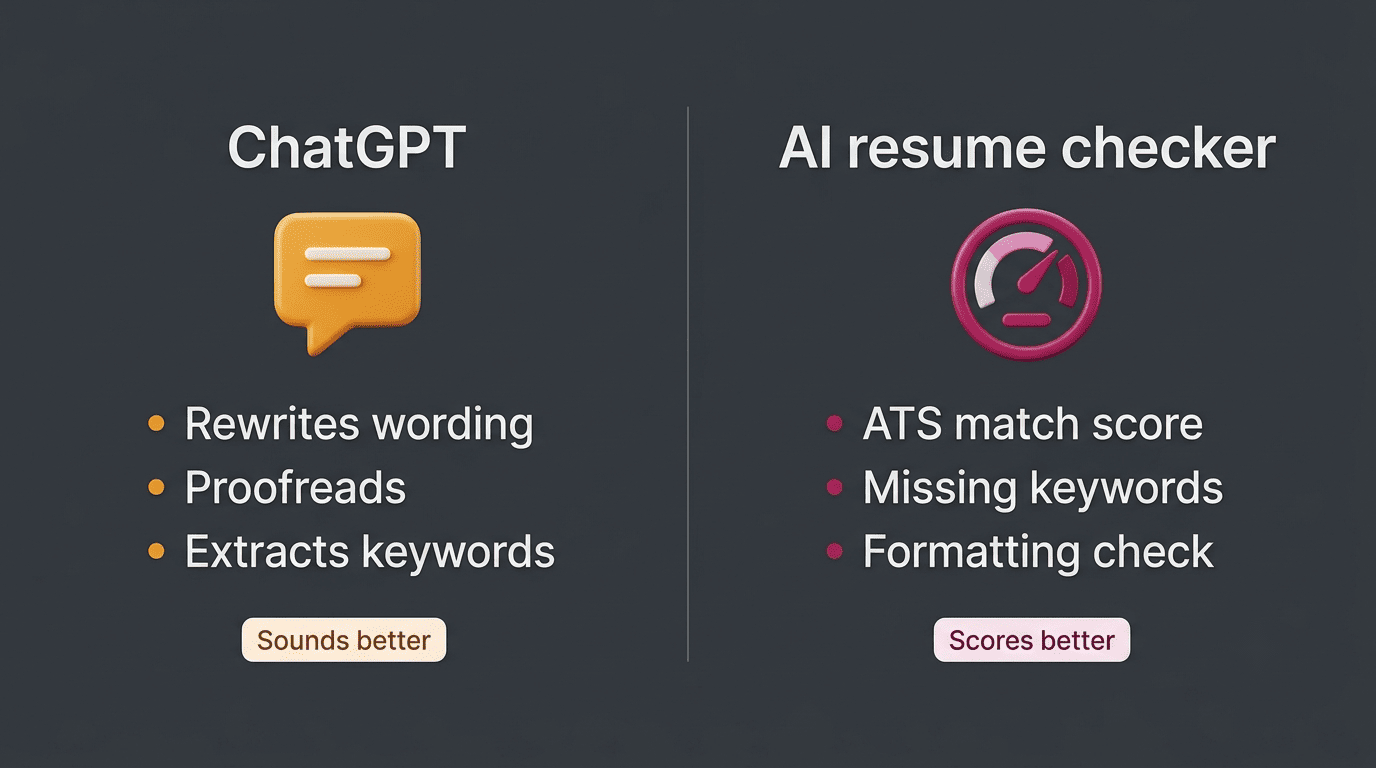
That gap between «sounds better» and «scores better» is exactly what a dedicated AI resume scanner is built to close.
| Task | ChatGPT | Dedicated AI resume checker |
|---|---|---|
| Proofread grammar and wording | Yes | Limited |
| Rewrite bullets into achievements | Yes | No |
| Extract keywords from a job posting | Yes | Yes |
| ATS match percentage | No | Yes |
| Simulate Workday / Greenhouse / Lever / iCIMS parsing | No | Yes |
| Catch formatting issues (columns, text boxes) | No | Yes |
The best ChatGPT prompts to review your resume
Vague prompts produce vague output. Specific prompts, with your resume and the target job description pasted in, produce something you can actually use.
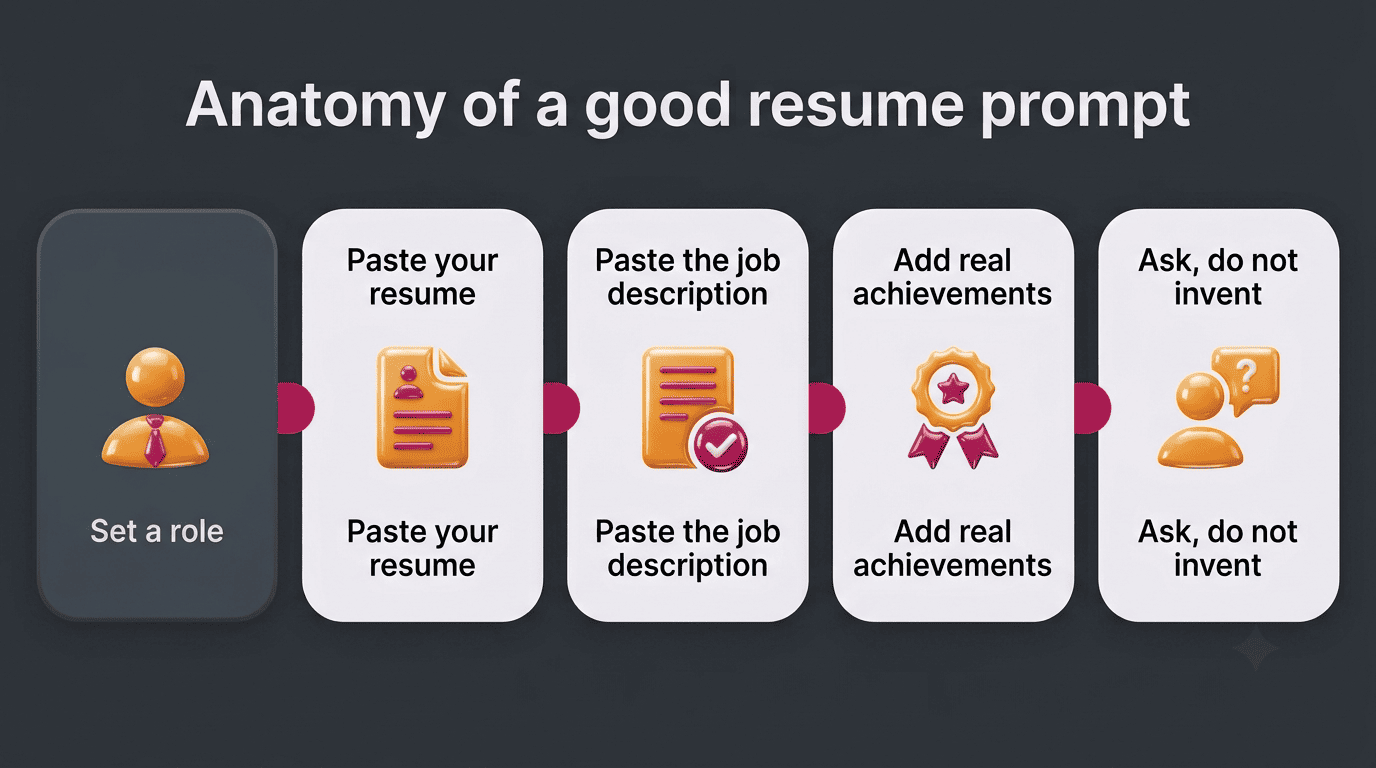
Start with a role prompt
Setting a role prompt before anything else shifts ChatGPT’s tone, vocabulary, and focus toward resume writing specifically, instead of generic editing. Use this verbatim:
You are an expert resume writer with 20 years of experience helping candidates land interviews. Review my resume below and help me improve it — do not invent or exaggerate my experience, only sharpen how I describe what I actually did.A role prompt like this consistently produces more focused, resume-specific feedback than asking ChatGPT to «look at my resume» with no framing.
Proofread and strengthen bullets
Once the role is set, run a second prompt to proofread for errors and word choice, then convert flat task descriptions into achievement statements:
Proofread this resume for grammar, tense consistency and word choice. Then rewrite each bullet using the format: action verb + what I did + measurable result. Ask me for the missing numbers instead of making them up.The last line matters — it’s what stops ChatGPT from filling gaps with guesses. A reasonable target is that roughly 60% of your bullets end up carrying a measurable result once you’ve fed it real numbers.
Tailor to a job description
Compare against the posting directly. Paste the full job description and ask a targeted question instead of a vague one:
Compare my resume to this job description and identify any keywords or skills the posting uses that my resume doesn't currently include.Then integrate naturally, not by stuffing. Ask ChatGPT to weave in only the keywords that genuinely apply to your background, in context, rather than dropping a keyword list at the bottom of the page.
Avoid the vague version. A prompt like «make my resume better» tends to produce hollow, instantly recognizable AI phrasing — «results-driven professional,» «dynamic team player» — that reads as generic rather than specific to you.
Step by step: reviewing your resume with ChatGPT
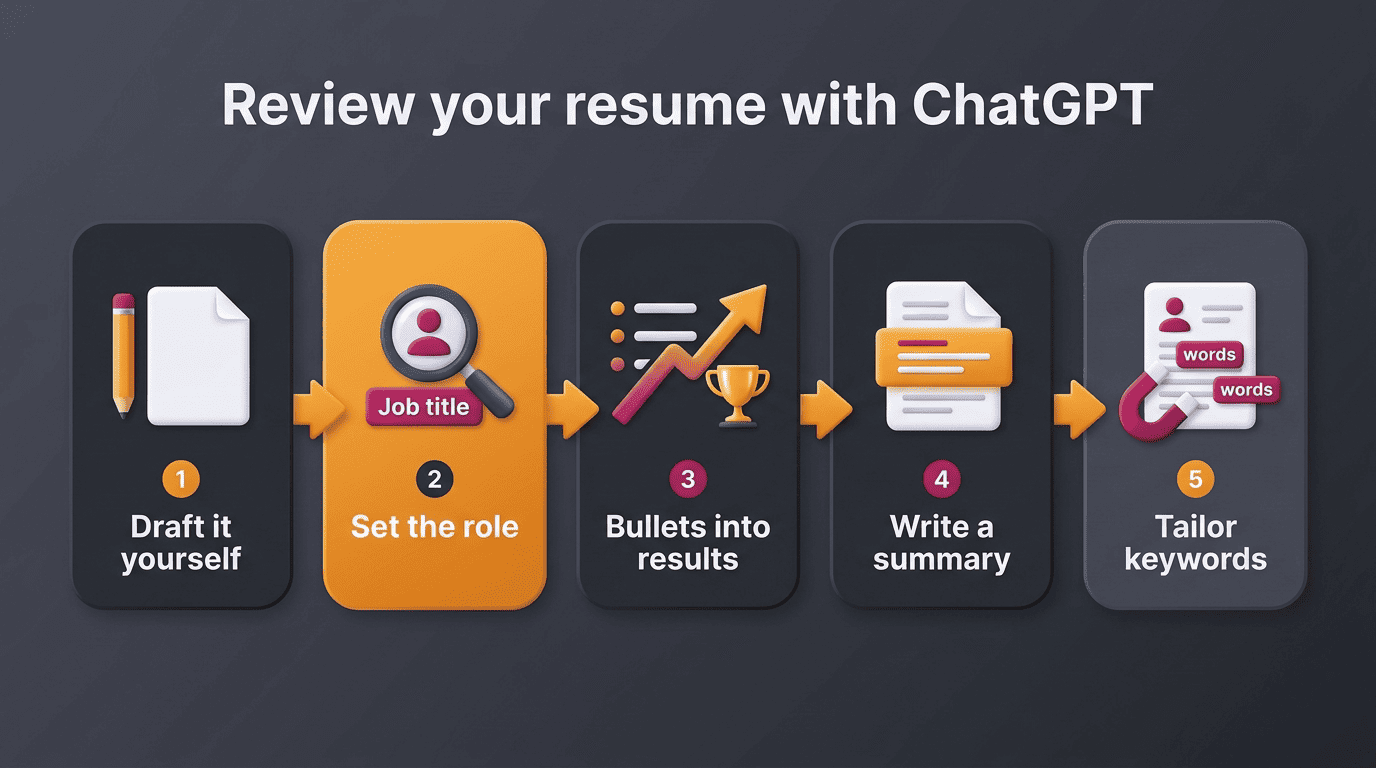
Following the prompts above in order, rather than firing them at random, keeps the output consistent and prevents ChatGPT from rewriting the same section three different ways. Before you open a chat, line up:
- Your current resume
- The full job description, not just the title
- Two or three quantified achievements you can point to
| Input | Why it matters |
|---|---|
| Current resume | ChatGPT can only sharpen what you give it — it has no other source for your history |
| Full job description | Needed for the keyword-gap and tailoring prompts, not just the job title |
| Quantified achievements | Prevents ChatGPT from inventing numbers to fill a gap |
- Draft the resume yourself first. ChatGPT doesn’t know your real accomplishments — it can only work with what you give it, so a rough first draft in your own words is step zero, not optional.
- Set the role prompt. Establish ChatGPT as an expert resume writer, as shown above.
- Turn bullets into evidence. Ask it to convert task descriptions into action verb plus result statements, one section at a time.
- Add projects and impact. Feed it specifics on any project, launch, or metric you can quantify, and ask for a tightened bullet.
- Write a 2-3 sentence summary. Ask for a short professional summary built only from what’s already in your resume.
- Tailor keywords to the posting, then read it aloud yourself. Run the keyword-gap prompt, integrate the results, and do one final human pass before you submit anything.
Tailoring a resume this way to a single posting typically takes about 15 to 20 minutes once you have the inputs ready — most of that time is the human read-through, not the prompting.
The limits: hallucinations, ATS scoring, and honesty
Everything ChatGPT produces still needs a human check before it goes out, for two specific reasons.
It will invent numbers if you let it
ChatGPT can produce confident but fabricated metrics and company details when it doesn’t have real data to work from — a known failure mode language models share, sometimes called a hallucination. If you ask it to «add impressive numbers» without supplying any, it may invent a percentage or a dollar figure that sounds plausible and isn’t true. Verify every number and claim before submitting, and never let it invent an outcome you didn’t actually produce.
In the field of artificial intelligence (AI), a hallucination or artificial hallucination is a response generated by AI that contains false or misleading information presented as fact.
Wikipedia
It can’t tell you your match score
Because ChatGPT only pattern-matches language rather than parsing your file the way real hiring software does, it can’t tell you how a given ATS platform would actually score you. Once you’ve tailored a draft with ChatGPT, running it through an AI resume checker for the match percentage and the missing-keyword list is the step that turns «this reads better» into «this scores better.»
Privacy and whether employers can tell
Pasting a resume into any chatbot means handing over your name, contact details, and work history, so it’s worth a minute of caution before you do it repeatedly.
Is it safe to paste your resume into ChatGPT?
Your resume holds personal data by definition, so review OpenAI’s data controls before pasting a full document — you can turn off chat history and model training in your account settings. A few identifiers are worth leaving out even after you’ve adjusted those settings:
- Full home address (a city and state is usually enough)
- Government ID or Social Security number
- Direct manager or reference phone numbers, unless a posting specifically asks for them
None of that information helps ChatGPT improve your wording, and it’s the data most worth keeping off a chat log.
Will employers know?
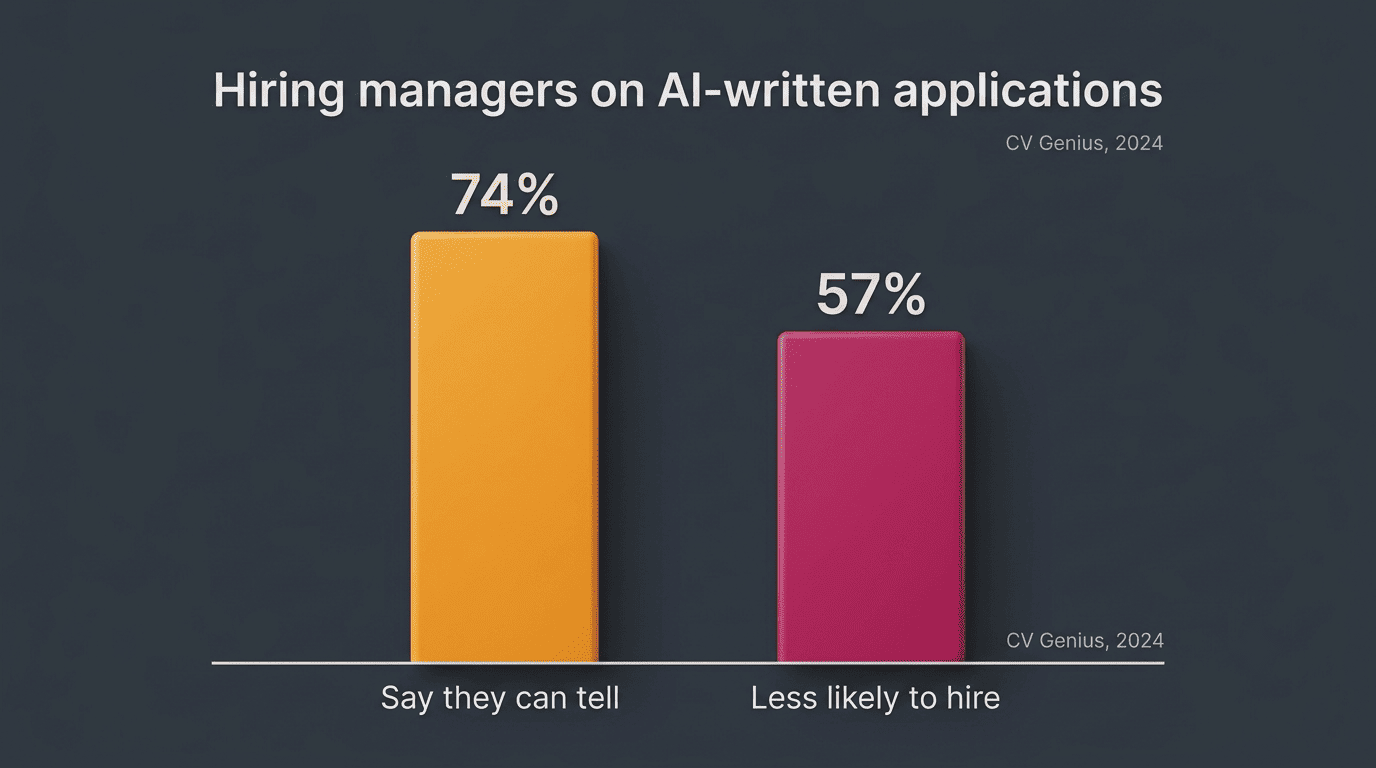
Employers can’t confirm you used ChatGPT, but uniform tone and generic phrasing are noticeable to an experienced reader. A 2024 CV Genius survey of hiring managers found that 74% said it’s possible to tell when AI was used to write a job application, and 57% said they’d be less likely to hire — or would treat it as a dealbreaker — if they spotted it. That survey polled hiring managers in the UK and Ireland, so treat the exact figures as directional for a US audience rather than a guarantee of how any individual recruiter reacts. Keeping your real voice and specific details is the safer path either way: the goal of using ChatGPT here is to present true experience more clearly, not to manufacture one. None of this — the prompts, the steps, or the scoring — guarantees an interview or a job offer; it improves how clearly your real experience comes through.