
AI Resume Checker for Keywords: Beat the ATS by Matching the Right Words
Most resumes are filtered by software before a person ever reads them, and the filter runs almost entirely on keywords. An AI resume checker scans your resume against a job description, finds the exact terms an Applicant Tracking System (ATS) is looking for, and shows you what is missing before you hit submit.

This guide walks through how ATS keyword matching actually works, how an AI checker finds and scores your keywords, and where to place them so your resume lands near the top of the recruiter’s list — without tipping into keyword stuffing.
What Are Resume Keywords (and Why They Decide Everything)
The definition that matters
Resume keywords are the specific skills, tools, job titles, and qualifications an employer lists in a job description. Roughly 98% of Fortune 500 companies run resumes through an ATS before a human sees them, and in one recruiter survey, 99.7% said they use ATS filters — 76.4% filter by skills, 59.7% by education, 55.3% by job title, and 50.6% by certifications. According to Indeed’s career advice on ATS resume keywords, the software is looking for a near-literal match to the language in the posting, not a rough approximation of your experience.
Hard skills vs. soft skills
Keywords split into two categories. Hard skills are measurable and job-specific — Python, SQL, financial analysis, CPR certification, Salesforce administration. Soft skills describe how you work — leadership, communication, cross-functional collaboration, project management. Hard skills carry the most weight in ATS scoring because they map directly to the requirements section of a job posting, while soft skills tend to matter more once a human recruiter is reading.
A few examples of each, pulled from common job postings:
- Hard skills: SQL, Python, Google Analytics, financial modeling, Salesforce, Adobe Creative Suite, project management software (Asana, Jira)
- Certifications: PMP, CPA, Six Sigma, AWS Certified Solutions Architect, RN license
- Soft skills: stakeholder management, cross-functional collaboration, mentoring, conflict resolution
- Action verbs that pair with keywords: led, built, reduced, negotiated, launched
How an ATS Reads and Ranks Your Keywords
From resume to plain text
The ATS strips your resume down to plain text, breaks it into sections — work history, skills, education — and matches those sections against the keywords the employer selected when the job was posted. As career expert Robin Ryan explains in her breakdown of the process for Forbes:
The applicant tracking system, often referred to as ATS, is the employer’s gatekeeper.
Robin Ryan, Forbes
That gatekeeper role is why two resumes with identical experience can get completely different outcomes: the one written in the employer’s own vocabulary passes through, the one written in the candidate’s own vocabulary often doesn’t.
Keyword placement changes the score
Where a keyword appears matters almost as much as whether it appears at all. A matching job title on the resume makes a candidate roughly 10.6x more likely to land an interview. A 2021 Harvard Business School study on hidden workers found that 88% of employers agree that qualified, high-skill candidates get vetted out of the process simply because they don’t match the exact criteria in the job description — not because those candidates lacked the underlying experience.
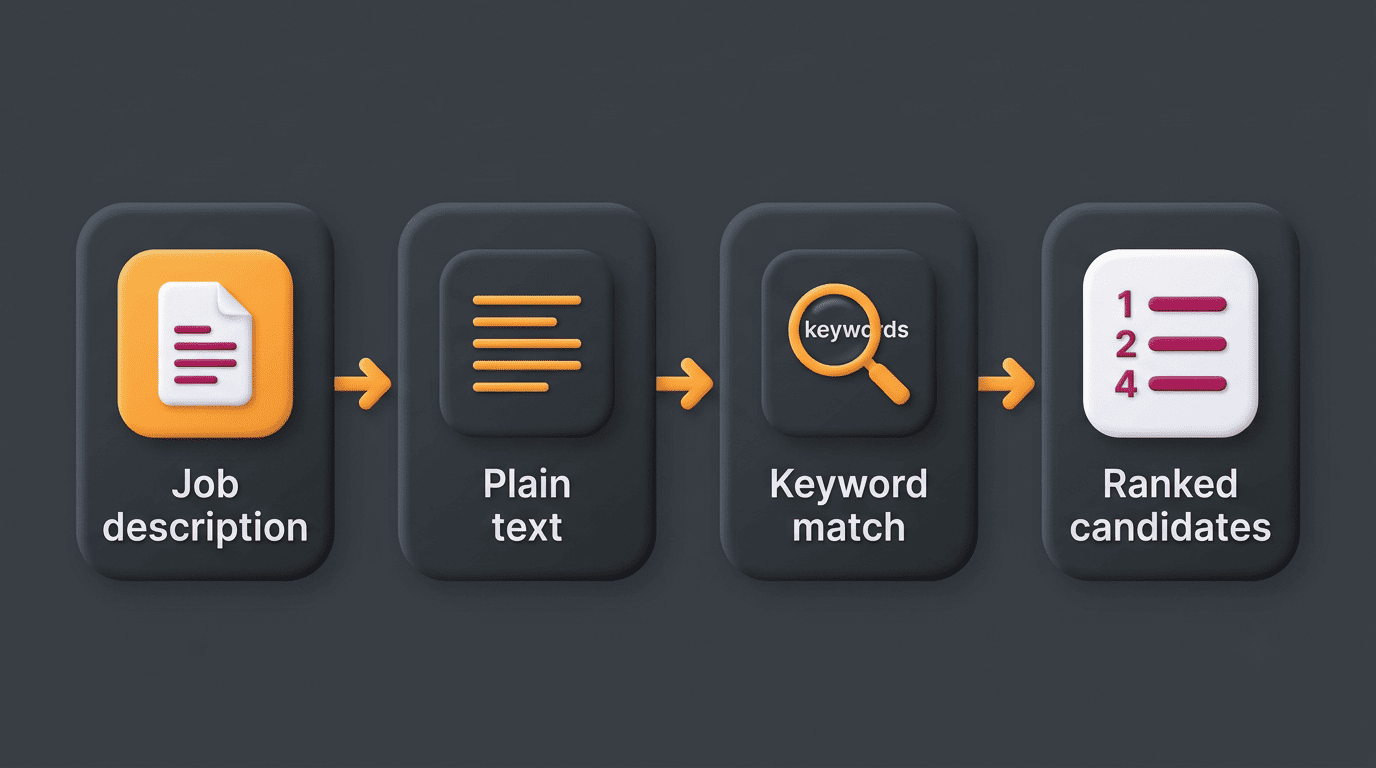
Different ATS platforms also weight sections differently, which is one reason a single generic resume rarely scores well against several distinct postings:
| ATS platform | Common among | What it tends to weight heavily |
|---|---|---|
| Taleo | Large enterprises, government contractors | Exact-phrase keyword match, job title |
| Workday | Mid-size to large corporations | Skills taxonomy, structured work history |
| Greenhouse | Tech and scaling startups | Recruiter-defined must-have keywords |
| iCIMS | Healthcare, retail, high-volume hiring | Certifications, licenses, section completeness |
| Lever | Startups and mid-market tech | Skills tags, sourcing-stage keyword filters |
How an AI Resume Checker Finds Your Missing Keywords
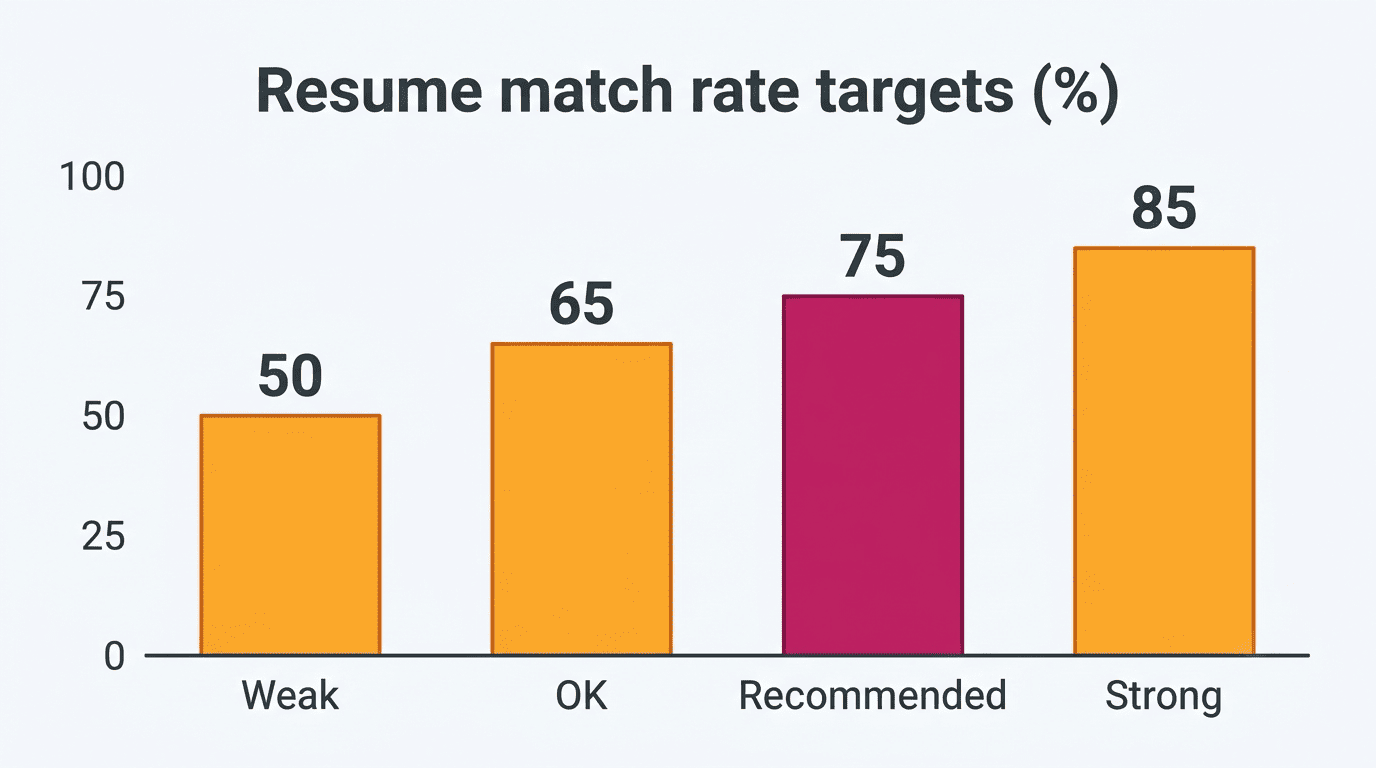
Paste the job description, get a match score. An AI ATS resume checker compares your resume to a target job description and returns a match rate — the percentage of important keywords your resume already covers. Jobscan’s guide to top resume keywords recommends aiming for at least a 75% match rate, and other tools flag a relevancy score under 80 as weak coverage. Because recruiters spend roughly six seconds on a first pass, a high match score is what decides whether a resume ever reaches the human-review pile.
Missing-keyword and skill-gap detection. Beyond a single number, the checker lists the exact hard and soft skills that appear in the posting but are absent from your resume, so you can add them in a truthful, specific sentence instead of guessing which terms matter.
Section-by-section scoring, not just a total. A useful AI resume checker breaks the score down by section — summary, skills, work history — so you can see whether the gap is a missing skills line or a summary that never mentions the job title at all.
A single scan of a job description against your resume typically returns:
- An overall match rate as a percentage
- A list of hard skills present in the posting but missing from your resume
- A list of soft skills present in the posting but missing from your resume
- Section-level flags — for example, «skills section incomplete» or «summary missing job title»
How to Extract the Right Keywords From a Job Description
Pull keywords from the requirements, responsibilities, and preferred-qualifications sections of the posting — those three sections carry almost all of the terms an ATS is configured to search for. Note anything that repeats: job titles, named tools, certifications, and action verbs tend to be repeated because the employer considers them non-negotiable. Insert the terms verbatim, matching the employer’s exact spelling and abbreviation style, for example using both «PMP» and «Project Management Professional» if the posting uses either.
Here is a short process for turning any job posting into a keyword list you can act on:
- Copy the full job description into a plain-text document.
- Highlight every skill, tool, title, and certification that appears more than once.
- Separate the list into hard skills and soft skills.
- Run the resume and job description through an AI resume checker to get a match rate and a missing-keyword list.
- Add the missing hard skills into your summary, skills section, and relevant bullet points — in context, not as a dumped list.
- Re-scan to confirm the match rate improved before you submit the application.
Aim for roughly 15-25 relevant keywords and 60-80% coverage of the posting’s key terms; past that point, adding more keywords stops improving the score and starts reading as padding.
Where to Place Keywords on Your Resume
High-priority zones
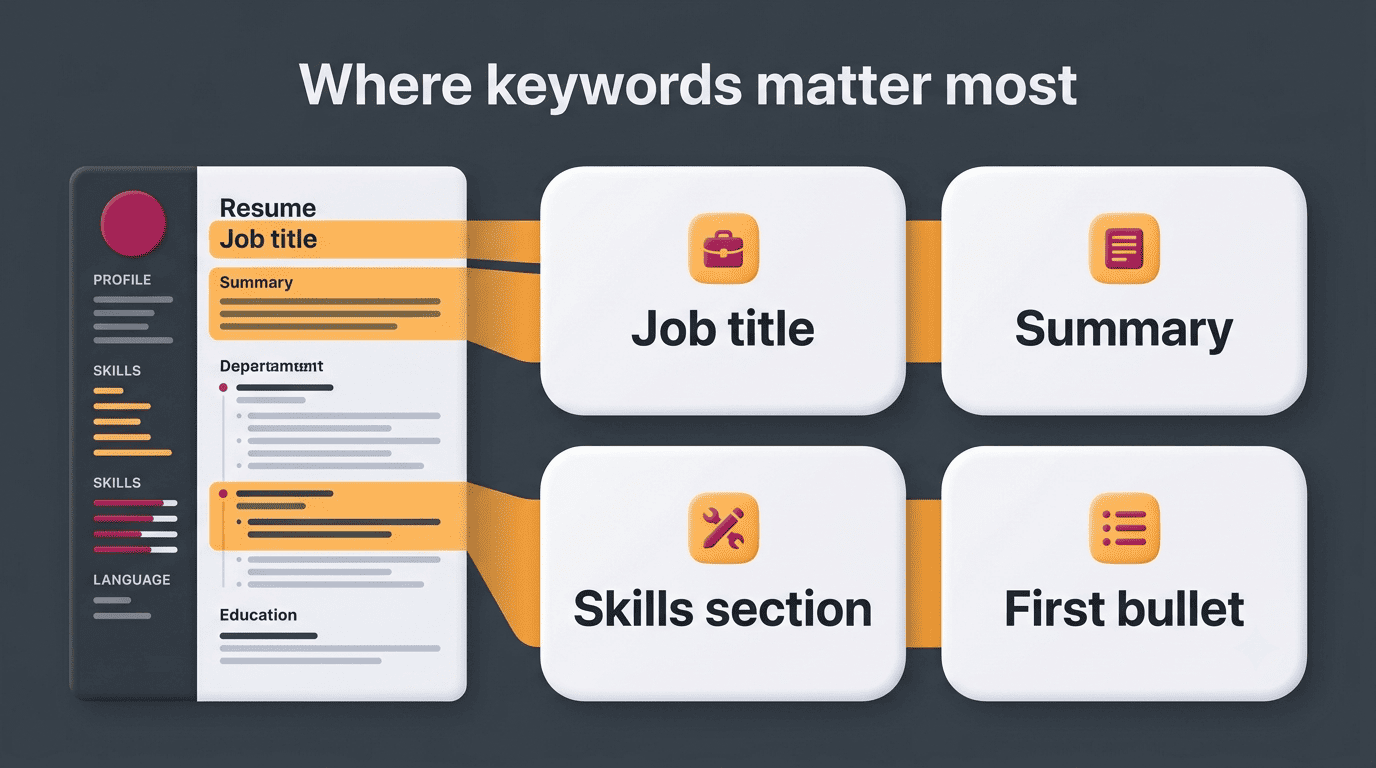
Put keywords where the ATS and the recruiter weight them most: the job-title line, the professional summary, the dedicated skills section, and the first bullet of each role. Inside bullet points, the action-plus-keyword-plus-result formula reads best to both software and humans — for example, «Led migration to AWS, cutting infrastructure costs 30%.»
| Resume zone | ATS weight | What to put there |
|---|---|---|
| Job title line | Very high | Exact or close match to the posting’s title |
| Professional summary | High | Top 3-5 keywords from the posting, in a sentence |
| Skills section | High | Hard skills, tools, and certifications, listed plainly |
| First bullet per role | Medium-high | Action verb + keyword + quantified result |
| Later bullets | Medium | Supporting keywords, context, and outcomes |
Formatting that keeps keywords readable
ATS software still struggles with images, tables, multi-column layouts, and text boxes — they can hide keywords from the parser entirely, even when the words are technically on the page. A simple single-column layout, standard section headings, and a .docx or plain-text file give the software the cleanest possible read of your keywords.
Elements that most often break parsing:
- Multi-column layouts and text boxes
- Tables used for layout instead of data
- Headers and footers containing contact info or section content
- Icons, graphics, and photos standing in for text
- Non-standard section headings the parser doesn’t recognize (e.g., «My Journey» instead of «Experience»)
The Keyword-Stuffing Trap (and How to Avoid It)
Cramming a resume with repeated keywords, or hiding white-text terms behind other content, gets flagged by modern ATS software and by human recruiters alike, and it can remove a candidate from the pool entirely rather than help them. Every keyword needs to sit inside a truthful, readable sentence that describes something you actually did — not a list bolted onto the bottom of the page.
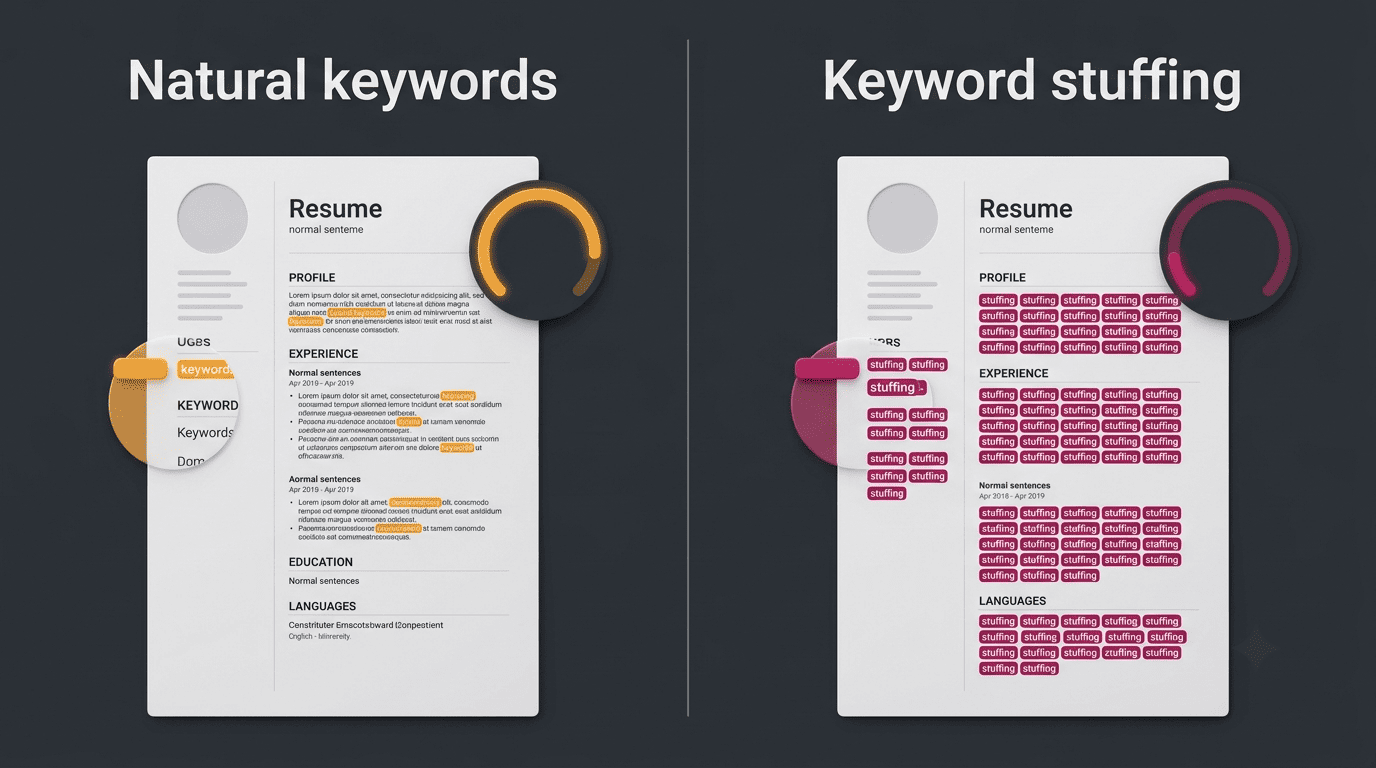
Running a draft through a resume checker online before you apply helps you hit the target coverage without crossing into stuffing, because the tool shows you the match rate at each stage rather than leaving you to guess how many mentions is too many. Treat the score as a diagnostic that flags gaps — it improves your odds of passing the filter, but it doesn’t replace real experience described honestly.