
AI Resume Checker Against a Job Description: How to Match, Score, and Tailor Your Resume
When you paste a job posting next to your resume, an AI resume checker reads both and tells you, in seconds, how closely they line up — a match score plus the exact keywords and skills you’re missing. That single number can be the difference between a resume that reaches a human and one that quietly sits in a database.
This guide explains how that comparison works, what match score is actually «good,» and how to close the gap without keyword-stuffing your way into a robotic-sounding resume.

Why matching your resume to the job description matters
Recruiters spend a median of roughly 7.4 seconds on the first pass of a resume, according to a widely cited 2018 eye-tracking study by TheLadders. Before a human even opens the file, an Applicant Tracking System (ATS) often ranks it against the posting based on how closely the language echoes the job description. An average corporate opening can draw around 250 applications, so relevance to that one specific posting is what pulls a resume out of the pile.
Recruiters and software both skim fast
Neither side reads carefully on the first look. Recruiters scan for a handful of familiar terms — job title, employer names, a few standout skills — and the ATS behind them scores the document the same way, comparing its text against the posting’s language. A resume written for «everyone» tends to read as generic to both.
What an ATS actually does (and doesn’t)
An estimated 97-99% of Fortune 500 companies use an Applicant Tracking System to manage incoming applications — Jobscan’s most recent count (2025) puts it at 97.8%, or 489 of the 500. These systems parse resumes and rank them by keyword relevance to the job — but the popular claim that «75% of resumes are auto-rejected by ATS» is disputed and closer to a myth. Most platforms filter and sort candidates for a recruiter to review; they don’t mass-reject applications without any human ever seeing them. Matching your resume to the posting improves where you land in that ranking — it isn’t a locked gate you either pass or fail.
A typical ATS pulls out a fairly narrow set of signals from your resume, then uses them to rank you against everyone else who applied:
- Job titles, past and present
- Hard skills and tools named in the document
- Years of experience per role
- Education level and, sometimes, specific degrees
- Keywords and phrases that overlap with the posting
How an AI resume checker compares your resume to a job description
The mechanics behind an AI resume checker are simpler than they sound, and the same basic flow shows up across most tools in this space.
Step by step: upload, parse, score
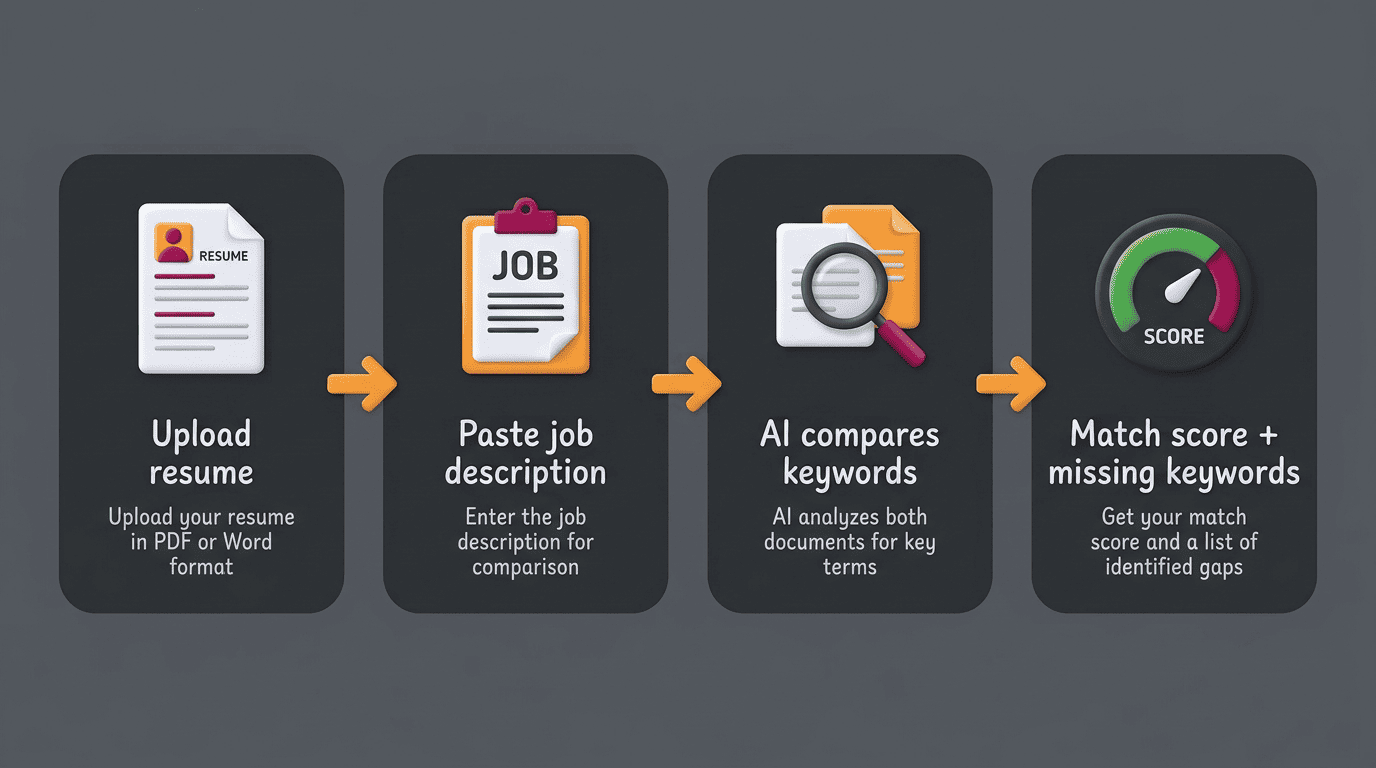
- Paste or upload your resume (usually PDF or DOCX).
- Paste the full text of the job description you’re targeting.
- The tool extracts skills, job titles, and keywords from both documents.
- It compares the two sets of terms and calculates overlap.
- You get back a match score, typically 0-100%, plus a list of missing keywords.
- You revise your resume to genuinely address the gaps.
- You re-run the check to confirm the score improved.
Most scans complete in around 30 seconds, since the comparison is a text-matching operation rather than anything requiring deep review.
Reading the match score
The number itself only means something in context. Resume.io’s scoring bands frame it this way: 80% or higher is generally «headed for an interview,» 60-79% is roughly a coin flip, and 40% or below may not get through initial screening at all. Jobscan recommends targeting around 75%, with 65% as an acceptable floor. Across tools, the general consensus lands in a similar place — 60-80% is considered a solid match, and scores under roughly 50% rarely make it past the first filter.
On average, recruiters spend about 7.4 seconds scanning a resume before deciding whether to read further.
TheLadders, 2018 Eye-Tracking Study
It’s worth resisting the urge to chase 100%. A perfect score almost always means the resume has been stuffed with every term from the posting regardless of whether it fits naturally, which reads as artificial to a human reviewer even if the software approves of it.
A more useful goal is a score that’s high enough to clear the first filter while still reading like something a real person wrote. That’s why most tools report a band rather than a pass/fail line — a resume in the 60-79% range can still land an interview if the content is strong, while a 95%+ score built on forced phrasing can backfire once a recruiter actually reads it.
| Match score | What it typically means |
|---|---|
| 80-100% | Strong alignment; likely to reach a recruiter |
| 60-79% | Moderate match; roughly even odds |
| 40-59% | Weak match; often needs real revision |
| Below 40% | Unlikely to clear initial screening |
Hard skills, soft skills, and keywords: what gets weighted
Not every matching keyword counts the same amount toward your score, and understanding the hierarchy helps you prioritize which gaps to close first.
Hard skills carry the most weight. Concrete, testable abilities — a programming language, a certification, a piece of software, a measurable technical process — are what most matching algorithms weigh first, and they carry substantially more weight than soft skills in the overall calculation.
Education requirements come next when they’re explicit. If a posting states an advanced degree is required, that credential factors into the score in a way a «nice to have» line item doesn’t.
Job title alignment matters more than people expect. A resume with a title close to the one in the posting tends to score better, even before the bullet points are compared.
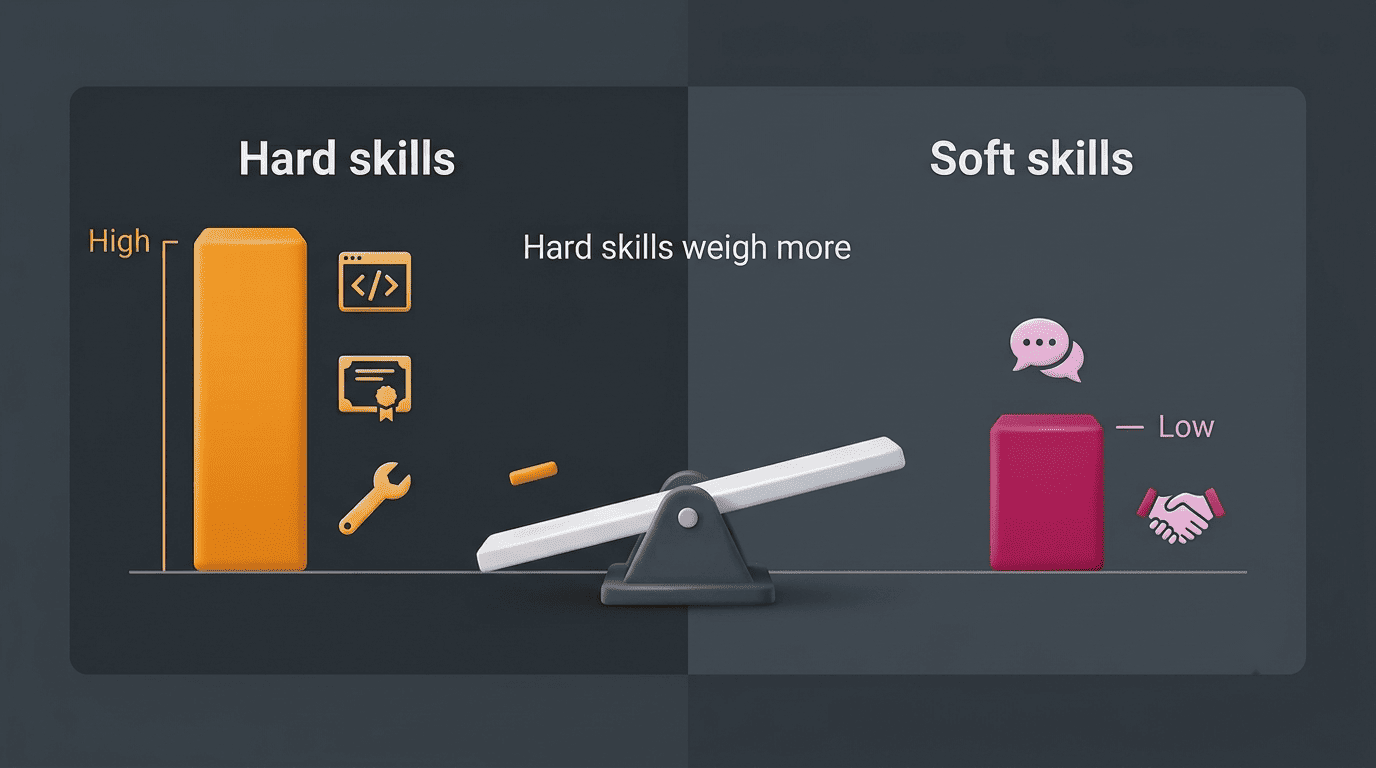
Soft skills and general keywords round out the score. Terms like «communication» or «leadership» still count, but they sit lower in most weighting models than hard, verifiable skills.
The priority order
Jobscan’s published weighting places hard skills first, followed by required education level, then job title, then soft skills, then other general keywords. That ordering is useful when you’re deciding where to spend your editing time: a missing hard skill you genuinely have is worth fixing before you tweak adjectives.
| Ranking | Factor | Example |
|---|---|---|
| 1 | Hard skills | Programming languages, certifications, named tools |
| 2 | Required education level | Degree stated as mandatory in the posting |
| 3 | Job title | How closely your title matches the posting’s title |
| 4 | Soft skills | Communication, leadership, teamwork |
| 5 | Other keywords | Industry terms, general phrasing overlap |
Exact-match vs synonyms
Modern parsers can handle some synonyms and context — recognizing that «led a team» relates to «leadership,» for instance — but exact phrasing from the posting still matters more than most people assume. If a listing asks for «project management» and your resume says «managed projects,» some systems catch the overlap and some don’t. Where it’s genuinely true, mirroring the posting’s exact terminology is the safer choice.
How to close the gap without keyword stuffing
A missing-keyword report is a starting point, not a script to paste in verbatim.
Add missing keywords honestly
Take the list of missing terms and keep only the ones that describe skills or experience you actually have. Then work them into real bullet points with context and a measurable result, rather than tacking a keyword list onto the bottom of the page. Standard résumé guidance echoes the same principle: a resume is meant to highlight the specific skills and accomplishments that match the target job, not read as a generic list. Tailored resumes can earn up to three times more callbacks than generic ones sent to every opening, according to data cited by Jobscan.
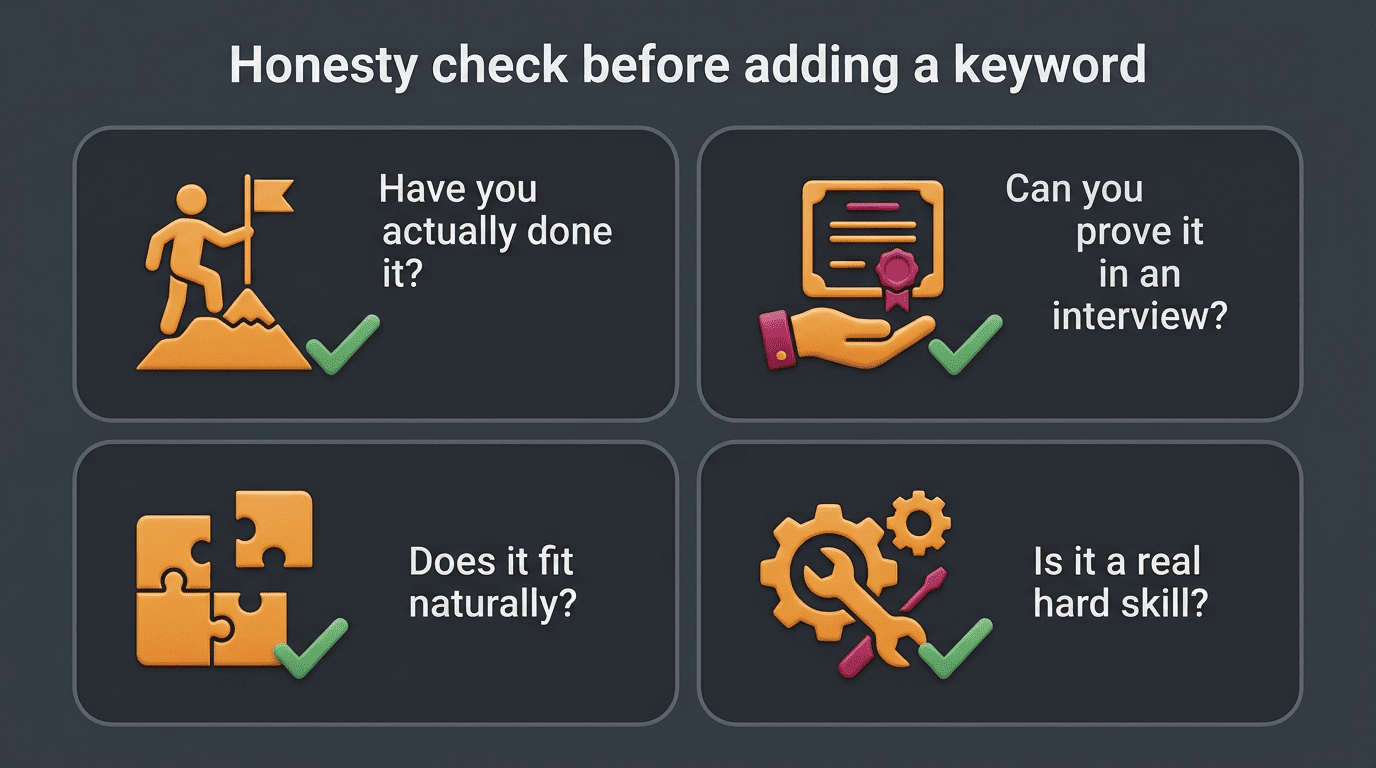
Before adding a missing keyword anywhere, run it through a quick honesty check:
- Have you actually done this, even under a different name or process?
- Can you back it up with a real example if asked about it in an interview?
- Does it fit naturally into an existing bullet, or would it force an awkward sentence?
- Is it a hard skill or qualification, not just a buzzword from the posting?
Rewrite bullets around the posting’s language
Rather than inventing new experience, reorganize and rephrase what you’ve already done to emphasize what the posting is asking for — a rephrase-don’t-fabricate approach, similar to what tools like HyperWrite’s resume matcher recommend. This distinction matters: 49% of hiring managers say they would reject a resume they believe was AI-generated or fabricated, according to Resume.io survey data. The goal of an AI resume checker is to help you present real experience more clearly, not to manufacture qualifications you don’t have.
Passing the ATS vs actually getting the interview
A strong match score gets you further down the funnel, but it isn’t the finish line.
A high match score is a first hurdle, not a guarantee
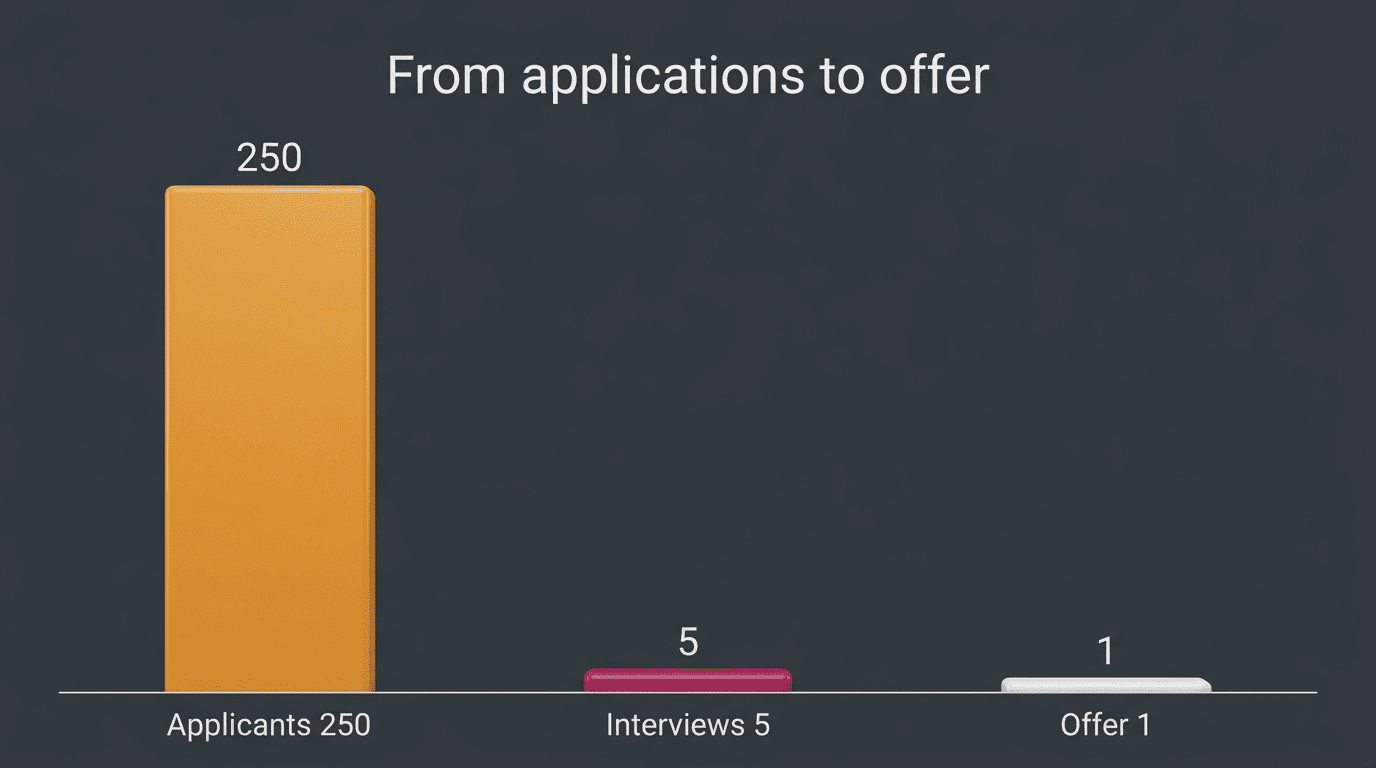
Even resumes that clear an 80%+ keyword match don’t all convert to interviews — of roughly 250 applicants for a typical opening, only a handful, often around five, make it to an interview, and just one gets an offer. The match score increases the odds a human reads your resume; the actual content, achievements, and clarity of your bullet points still have to convince that person. Treat the score as a filter you need to clear, not as proof that you’re the right candidate — an AI resume checker improves your chances and helps you tailor faster, but it does not guarantee an interview or a job offer.
Privacy and cost
Most checkers offer a free scan, though they often cap file size — Resume.io, for example, limits uploads to 2MB in PDF or DOCX format. Keep in mind you’re uploading a document that contains your name, contact details, and work history, so it’s worth using tools with a clear, published privacy policy before you paste in a full resume.
Before uploading a resume to any checker, it’s worth confirming a few basics:
- The site publishes a privacy policy that explains how uploaded files are stored and used
- The free tier covers what you need, or the paid tier’s price is clearly listed
- The accepted file formats (usually PDF or DOCX) and size limit match your document
- You can delete or export your data if you decide to stop using the tool